
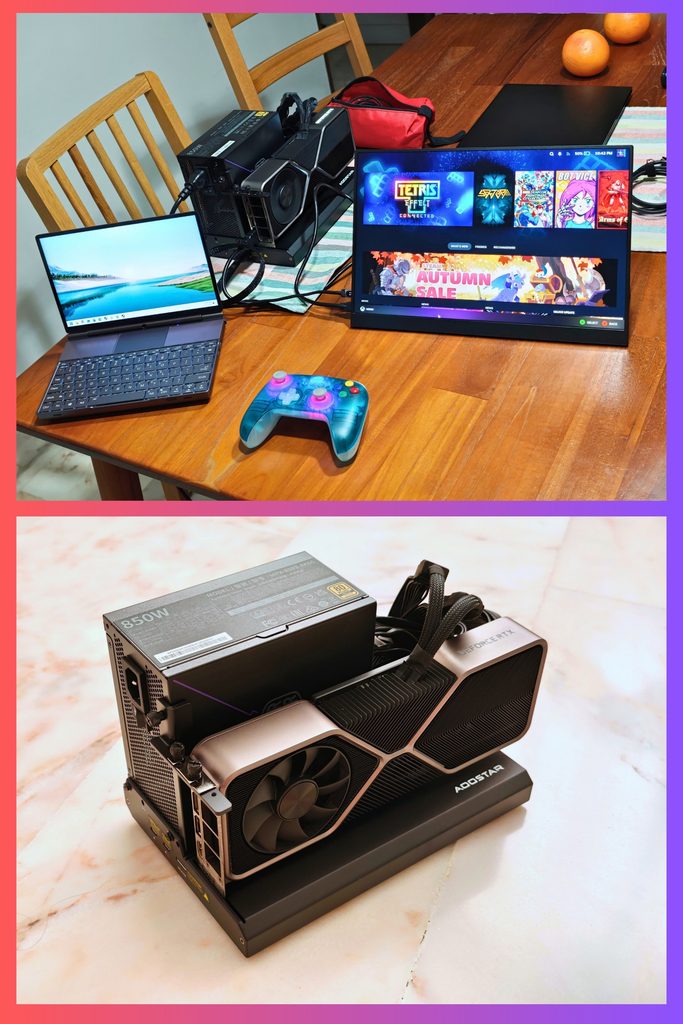
Friday evening geek stuff: My Aoostar EG02 eGPU order from Pinduoduo finally arrived after several weeks and I could start testing it with my different laptops.
An eGPU lets you turn most standard laptops into gaming machines or local AI machines. It works like a Lego set: you just need your own parts and a screwdriver.
🔵 You must have your own desktop graphics processor (GPU, Nvidia or AMD) and PC power supply (600-800 watts), which you will connect together using the eGPU. A desktop GPU is usually more powerful than a gaming laptop GPU.
🔵 Then, connect the eGPU to a compatible Windows laptop. The connection is via USB Thunderbolt or Oculink, the former being the more universal connector, which works with most laptops.
🔵 The last step is to connect the eGPU to an external monitor, where you will play your games powered by the eGPU. The internal monitor of the laptop continues to use the laptop’s weaker graphics processor.
I tried the eGPU with my Acer Swift Go 16 AI laptop and the smaller GPD Win Max 2 handheld PC and both worked quite well. I might plug this into the OneXPlayer 3 handheld later today.
Unfortunately, GPU prices are ridiculously high right now, just like those of RAM and storage, due to the AI bubble. An RTX 5090 that used to cost $4k is now over $9k! This setup is more for gamers who have unused GPUs that they want to repurpose. I used my old Nvidia RTX 3080 GPU and a Cooler Master 850W power supply.